The Bambu-ification of 3D Scanning Is Here: Bambu Lab’s S1 Costs $1,699

Bambu Lab's long-teased 3D scanner leans heavily on a simple user experience that pushes the technical nitty-gritty into the background. About what we'd expect from Bambu Lab, then.
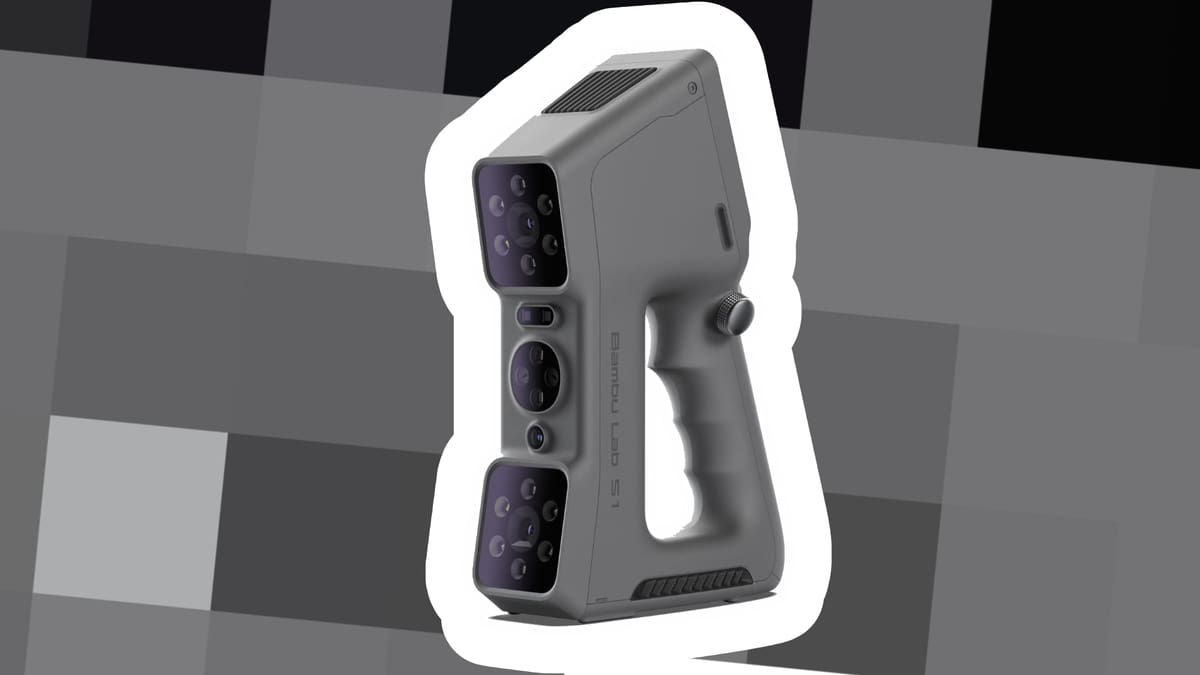
Bambu Lab’s second sashay into creative tech that isn’t 3D printing, the Bambu Lab S1, has arrived – a CO2 laser cutter was the first. Scanning has gotten a lot easier and cheaper over recent years, and Bambu Lab’s first crack at it appears to be a revertion to type for the company, but something new for the space: hide as much of the process as it can, and soften the edges of the experience.
This Bambu-ification starts in Bambu Scan, the free companion app. You get one of 14 scene presets, covering faces, car parts, small parts under 15 cm, artwork and glossy black parts, to choose from. Various parameters jump to optimize the scanning for that object, ostensibly taking the guesswork out of the process. Indeed if the type of object what you want to scan isn’t an option, there’s a mini setup wizard; answer a few questions and the software chooses the light source and settings for you. Mode changes happen on the scanner’s inbuilt 3.5-inch touchscreen.
It’s powered by two 4,800 mAh batteries, rated for up to 3.5 hours runtime, according to Bambu Lab. High speed Wi-Fi 6 handles data streaming to your computer. As you might expect, there’s one-click send to Bambu Studio for the edited file. The export of meshes or scan data in STL, OBJ and PLY export means you’re not locked into this path, too.
Stepping back and looking at what Bambu Lab offers in the S1, it seems like a step further down a road rivals in the space are already on. CrealityScan offers a beginner one-click process and object-type presets, while Elegoo’s software launched alongside its M1 Ultra last month with guided setup and one-click meshing.
From what we’ve seen, where the S1 differentiates itself is what comes free after the scan. Bambu Scan includes eight tools to nudge the results closer to being useful, rather than fodder for dedicated reverse engineering software. These include measurement, feature fitting for planes, cylinders and the like, and pass/fail tolerance checks between those features. There’s also a color-coded deviation map against a reference model, including imported STEP files.
Familiar-ish Hardware, Familiar Limitations
Ergonomics play an important role in scanning. You have to hold the device up at arm’s length in front of you, often for extended periods of time, so every gram counts. The Bambu Lab S1 weighs 710 g in total – some 200 grams more than Elegoo’s M1 Ultra.
The S1 is equipped with a multitude of buttons and a dial that Bambu Lab says puts all the essential controls at your fingertips without needing to take your focus off the device and scanning.
The data capture tech on board is less of a departure from others in the space. The blue laser runs in single-line, 7-line and 34-line modes, with infrared structured light as the eye-safe option for scanning people. Color data is captured, though not elaborated on in the device’s specs. Bambu Lab claims a volumetric accuracy of up to 0.02 mm +/-0.06 mm/m, a figure Elegoo’s M1 Ultra also presents at the same $1,699 price point.
At launch, only Windows machines are supported, with macOS support to follow “soon”. 3D scanning is a graphically heavy process compared to slicing in 3D printing, so powerful computing hardware is required.
Bambu Lab’s minimum PC specs for the S1 are an Intel i7 7th Gen or AMD Ryzen 7 series CPU, with at least 16 GB RAM and Nvidia graphics (2060 or better) with at least 6 GB VRAM. For smooth performance the recommended specs are an Intel i7 13th Gen or AMD Ryzen 9 series, with 32 GB RAM and an Nvidia graphics (3060 or better) with more than 8 GB VRAM. Nvidia graphics is a hard caveat – AMD cards are not supported.
WiFi6 is a prerequisite for high-speed wireless scanning with the S1. A USB data transfer dongle is planned for release that smooths over this requirement, should your PC not have WiFi6.
The Bambu Lab S1 3D scanner is available to preorder on the Bambu Lab webstore now. U.S. preorders are expected to ship around December 4.
You’ve Read That; Now Read These…


License: The text of "The Bambu-ification of 3D Scanning Is Here: Bambu Lab’s S1 Costs $1,699" by All3DP is licensed under a Creative Commons Attribution 4.0 International License.