SelfCAD Launches AI: Prompt then Edit 3D Models Directly in Your Browser

The browser-based CAD platform’s experimental AI Assistant generates functional assemblies, organic meshes, and profile-based designs from text with image references supported, too.
SelfCAD, the browser-based 3D modeling and CAD platform, just added a new AI Assistant feature to its 3D modeling toolkit, giving users a new way to turn natural-language prompts into 3D models without building everything manually, the company says.
The new assistant lives inside the software’s existing modeling workspace and currently offers three distinct generation modes: Functional Assembly, Organic Model, and Profile. Rather than funneling every prompt through the same text-to-3D process, each is intended for a different kind of geometry and workflow. SelfCAD describes the features as experimental and says they will continue to be updated.
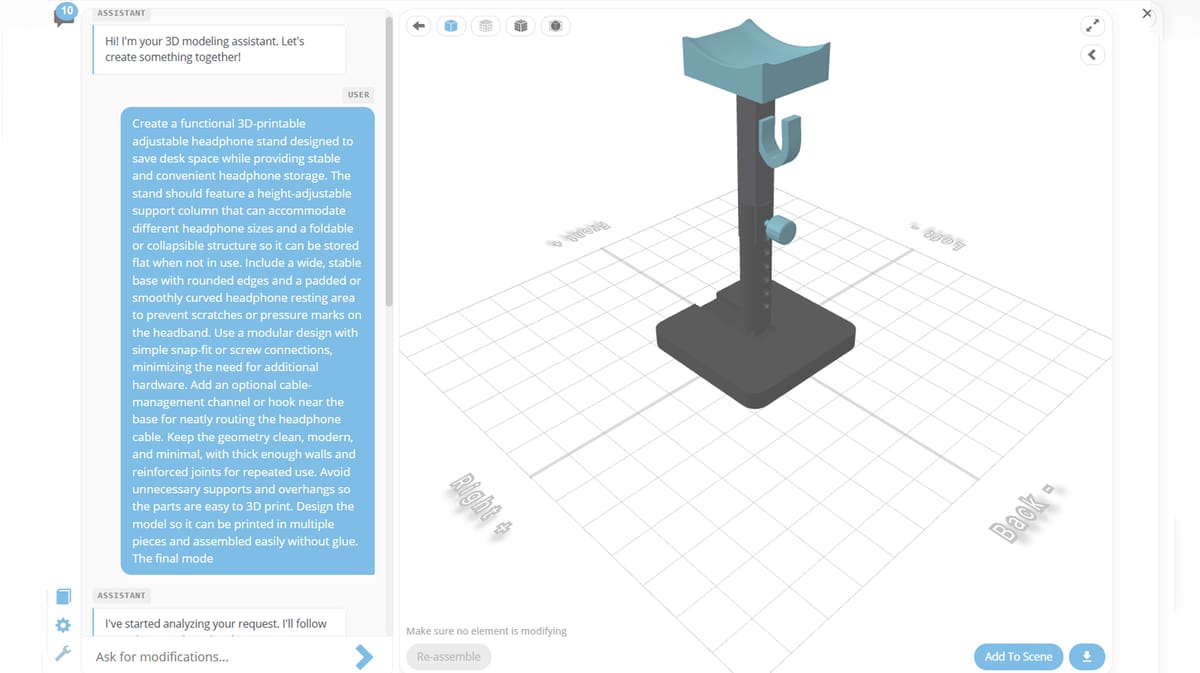
The most interesting of the three for 3D printing might be Functional Assembly. While plenty of AI generators can produce a mesh resembling whatever you describe, SelfCAD is aiming this mode at practical, part-based designs such as brackets, enclosures, phone holders, furniture, mounting systems, and other mechanical or household objects.
Unlike a lot of the AI modeling assistants out there, SelfCAD doesn’t offer a free trial or free limited use. You can’t even see what the AI proposes without buying at least $10 of credits, one of which goes to see the first draft.
To get started, once you have credits, SelfCAD says all you have to do is enter a description and the AI first proposes a modeling plan, including the components it thinks the object needs, their dimensions, geometry, and relationships. You can revise that plan before spending additional credits generating the geometry – changing dimensions, removing parts, adding components, or adjusting how pieces connect. Once approved, the individual elements are generated and assembled into a model that can then be added to the regular SelfCAD scene for further editing.
This ability to manually edit your model could make SelfCAD’s approach more useful than a simple “prompt in, STL out” generator. The generated functional model remains something users can continue working on with SelfCAD’s standard modeling tools, and the AI workflow encourages specifying dimensions, holes, slots, component positions, and mechanical relationships in the prompt. SelfCAD itself cautions users to inspect important dimensions and features rather than assuming the first AI result is correct.
Not Just Nuts and Bolts
For less mechanical designs, Organic Model handles characters, animals, sculptures, plants, fantasy creatures, and other shapes dominated by curves rather than conventional CAD features. Users can choose between voxel- and point-cloud-based generation before describing the object they want. The result is a single detailed solid mesh that can be further modified inside SelfCAD.
The third option, Profile, targets simpler objects whose defining feature is a 2D outline – think signs, plaques, badges, emblems, silhouettes, and decorative wall pieces. A prompt can specify the outline, thickness, text, and other details before SelfCAD turns it into a 3D design.
Prompts can contain up to 1,000 characters, and SelfCAD recommends supplying specifics such as dimensions, components, features, orientation, and intended appearance rather than relying on short descriptions. Users can also attach a reference image in supported workflows, giving the AI additional visual information to work from.
Of course, text- and image-to-3D generation itself is hardly new. Tools from Meshy, Tripo AI, Hi3D, Autodesk, and others are already pushing variations on conversational or generative 3D modeling. What makes SelfCAD’s implementation notable is that it sits inside an existing general-purpose browser-based modeling environment and attempts to separate functional CAD-like generation from the organic mesh generation commonly associated with text-to-3D tools.
AI Comes With a Meter Running
The feature uses a separate credit system than your subscription to SelfCAD, which has a limited free plan, plus a $14,99/month Pro plan and plans for organizations. This is where experimentation could start adding up.
SelfCAD currently prices AI credits at $1 per credit, with a minimum initial purchase of 10 credits. There’s no free trail of the AI feature so we didn’t take it for a test drive. According to the company, a typical four-part Functional Assembly consumes around five credits, or roughly $5. Drafting the assembly’s parts list typically costs around one credit, individual part generation about half a credit each, modifications around one credit, and final assembly around one credit.
Organic generation is substantially cheaper on paper, at roughly half a credit for a base model, while Profile designs start at around 0.2 credits. Editing either also consumes credits. SelfCAD stresses that these aren’t fixed prices: actual consumption varies with the computation and complexity of each task, with usage recorded in a log visible to the user.
So, no, describing a bracket to an AI hasn’t made CAD disappear just yet. But moving prompt-based generation into the same workspace where the resulting geometry can be inspected, corrected, and developed further is arguably the more useful direction for 3D printing.
Whether SelfCAD’s AI can reliably produce dimensionally accurate, genuinely printable functional parts is another question – and one that will require some hands-on testing. For now, this experimental feature is on the right track.
You May Also Like:



License: The text of "SelfCAD Launches AI: Prompt then Edit 3D Models Directly in Your Browser" by All3DP is licensed under a Creative Commons Attribution 4.0 International License.