Claude Comes to CAD: Anthropic’s AI Can Now Help Build 3D Models in Autodesk Fusion

As part of Anthropic’s Claude for Creative Work launch, Autodesk Fusion is now available through Claude, turning natural language prompts into real design actions, bridging concept and manufacturable output.
This week, Anthropic introduced Claude for Creative Work, a set of connectors that let Claude work directly with popular creative and design applications, including Autodesk Fusion, Blender, SketchUp, and more.
Autodesk, Dassault Systèmes, Siemens, and others have all been expected to play the main role in bringing AI deeper into the design-to-manufacturing workflow. And they have in a careful, measured way. The companies that already own the engineering software stack seemed like the natural ones to make AI useful for 3D printing.
But Anthropic’s latest announcement suggests the AI industry is not waiting for CAD companies to build better AI. It is building its own bridge into CAD.
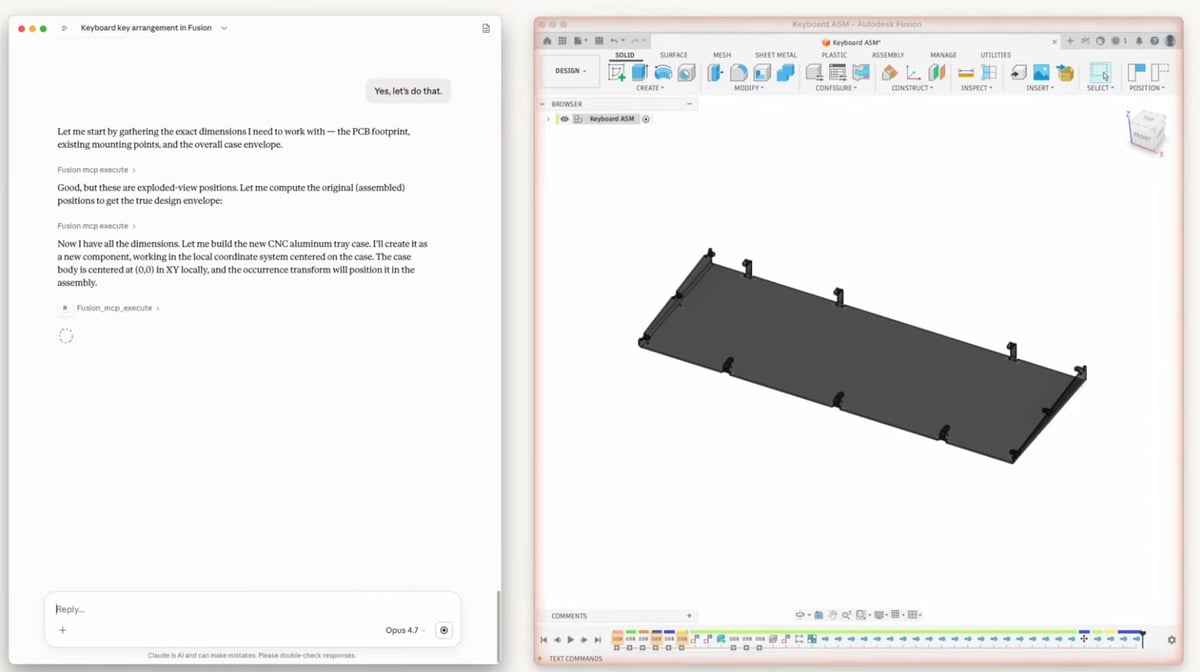
“At Autodesk, our approach to AI is simple: help move work forward—whether that happens inside our products or in the tools our customers already use,” says Autodesk’s Emily Scherbenski in a recent blog post conceding that Autodesk users already rely on outside AI in their design workflows.
The Autodesk Fusion Connector Is the Big Signal
According to Anthropic, designers and engineers with a Fusion subscription will be able to create and modify 3D models through conversations with Claude. Users will need a Fusion subscription (it’s not clear if the free subscription qualifies), and availability may also depend on a paid Claude plan.
“Unlike text or code, design work is built on geometry, constraints and relationships,” notes Autodesk. “The Fusion MCP (Model Context Protocol) gives Claude guided access to that structure, so users can participate in the design process while execution remains securely within Fusion.”
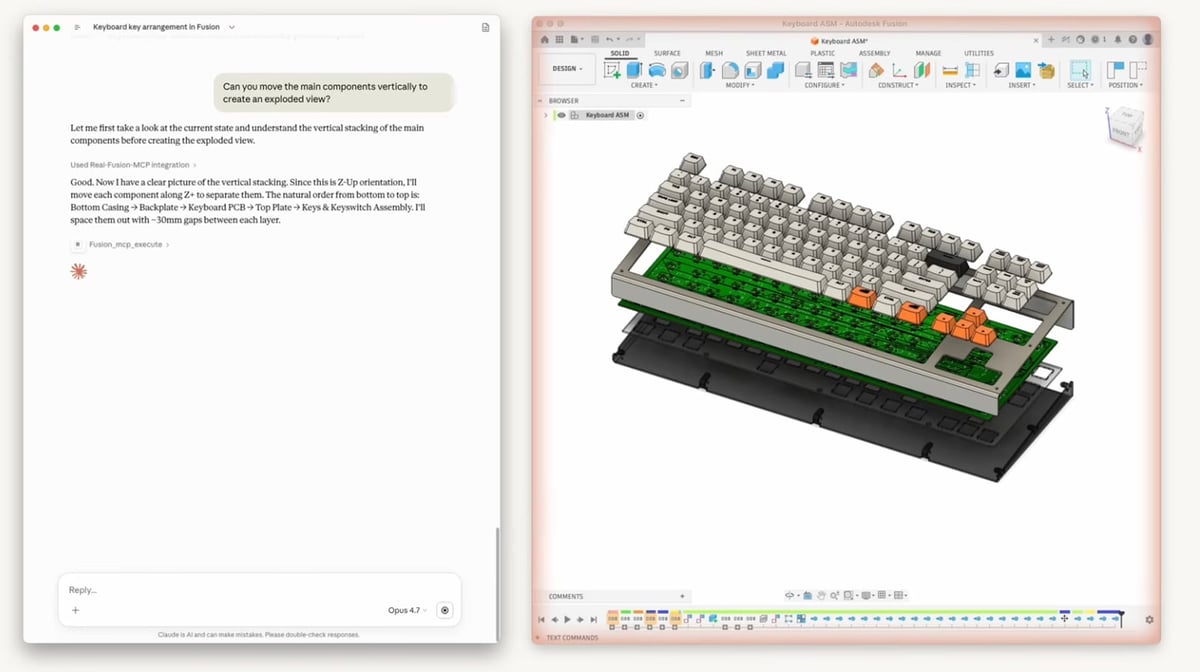
Autodesk is emphasizing security in its public comments on Claude for Creative Work, noting that this new connection maintains the Fusion user’s control.
Autodesk told All3DP that “With the Fusion MCP, Autodesk is extending Fusion into third party AI marketplaces—bringing design into the environments where ideas are imagined, explored and built.” This is subtly different from letting Claude into Fusion.
With the Autodesk Fusion Claude Connection, you can potentially:
- Turn natural language into design actions
- Iterate without starting from scratch
- Automate repetitive modeling steps
- Move faster from idea to manufacturable output
- Query design data across projects
Autodesk announced two separate MCPs:
Autodesk Fusion MCP is action-oriented. It lets an AI assistant connect to Autodesk Fusion so users can create, modify, and automate work on 3D models through natural language.
Autodesk Fusion Data MCP is understanding-oriented. Instead of primarily changing models, it helps AI search, understand, manage, query, and reuse Fusion design data across projects.
These MCPs are not limited to Claude. Autodesk describes MCP as an open standard for how AI systems interact with external tools and services, and says Autodesk MCP standardizes how AI systems access Autodesk tools and workflows.
We asked Autodesk if MCPs will be rolling out for its entire software line, including AutoCAD, and were told: “Today, we’re focused on the Fusion MCP integration with Claude. Nothing else to share at this time!”
From Prompt to Printable?
Of course, Claude is not suddenly a certified design engineer, build-preparation specialist, simulation expert, or quality manager, so for professionals who use Fusion every day, the benefit will be in workflow efficiencies.
In fact, for additive manufacturing, the most valuable part of Claude for Creative Work may not be model creation but pipeline coordination.
Anthropic describes Claude as being able to bridge tools in a creative pipeline: translating formats, restructuring data, and keeping assets in sync across projects that span multiple applications.
A service bureau, for example, might use AI to help intake customer files, summarize likely printability issues, generate quote notes, classify jobs by process, prepare design feedback, and create documentation. An internal engineering team might use it to move faster from design intent to manufacturable concept.
Additive manufacturing software companies might be quick to say: “We already do this better.”
In many cases, that will be true. Specialized AM software is still needed for process-specific build preparation, support optimization, simulation, machine connectivity, traceability, quality management, and production control. Claude will not replace those capabilities overnight.
But if designers begin their work by asking Claude to modify a Fusion model, check a Blender scene, generate a SketchUp concept, or script a repetitive workflow, then AI assistants become the interface layer above specialized software. AM software companies that remain closed may find themselves outside the AI-assisted workflow.
Being AI-accessible may become as important as being user-friendly.
What This Means for 3D Printing Users
For non-professionals using Fusion and other CAD tools, instead of learning every menu, command, scripting syntax, and file-format quirk, they may increasingly describe what they want done. (This is a welcome development to anyone who’s ever looked at the toolbars in Blender.)
The wide gap that exists between designing in Fusion (complex and daunting) and using a text-to-model tool like MeshyAI or Tripo AI (easy but unreliable results) is beginning to close just a bit.
For everyday 3D printing users, the near-term impact will likely be practical rather than revolutionary.
Expect AI to help with:
- generating first-pass models and design variants
- explaining complex software features
- preparing files for review or export
- batch-processing repetitive tasks
- creating documentation and customer-facing notes
- helping beginners understand printability problems
User Driven AI Adoption
The next major AI shift in additive manufacturing may not start inside a printer OEM, a slicer, or even a CAD company. It may start with a user typing a request into an AI assistant and watching it reach across the design stack.
“Autodesk supports customers across the full spectrum of AI adoption, from out-of-the-box assistance to tailored solutions,” says Jeff Kinder, Autodesk’s executive vice president of Product Development and Manufacturing Solutions, “bringing everyone along as the industry evolves.”
You May Also Like:


License: The text of "Claude Comes to CAD: Anthropic’s AI Can Now Help Build 3D Models in Autodesk Fusion" by All3DP Pro is licensed under a Creative Commons Attribution 4.0 International License.