
OrcaSlicer to Get Plug-Ins, Color Mixing and Native Parametric CAD

The OrcaSlicer devs have been busy. Native belt printing, parallel printing for IDEX and IQEX machines, and support for Bambu Lab’s H2C and A2L are just a few of the big changes in motion and testing in the OrcaSlicer 2.5 Alpha release.
It’s all about the plug-ins in the 3D printing world; following PrusaSlicer’s plugin support for the next generation of PrusaSlicer, OrcaSlicer is now getting in on the extensible action with its own Python-based plugin system.
OrcaSlicer version 2.5.0 Alpha, posted to GitHub as a pre-release on October 16, bundles its own Python runtime, meaning a plugin can be as simple as a single .py file or packaged with assets and other necessary files as a .whl – the type of code LLMs are very good at building nowadays. What you could do with a plug-in is completely open-ended, modifying the layout and look of the slicer, adding functionality and even slotting new steps into slicing itself, like editing layers or post-processing G-code.
The plugins are accessible via Orca Cloud, which has a plugin browser, or via direct install if you have the file. The approach is different to that of Prusa, which sandboxes every plugin out of an abundance of caution for system security. Orca Slicer’s approach is permissive, asking you to confirm before a plugin touches files outside its data folder, goes online, or launches a program. The release notes are upfront about this, advising installing only plugins you trust.
PrusaSlicer played it safer with its 3.0 alpha release on September 1. Its Lua plugins only generate objects for now (flow and temperature towers are the bundled examples), and the whole system is built around sandboxing, with no general disk or network access by default.
At the time of writing 53 plugins are listed on Orca Cloud, ranging from a print-twisting modifier by lead developer SoftFever, which demonstrates plugins’ ability to interact with the slicing process itself, to a plugin that gets OrcaSlicer communicating with cloud-connected Bambu Lab machines without the need to have Bambu Lab software installed.
Plug-ins are, to us, only the headline act, though. OrcaSlicer’s developers call 2.5.0 “the most feature-packed release in OrcaSlicer’s history,” citing more than 950 pull requests from over 140 contributors. We counted for ourselves: the release notes list 360-plus entries linking over 400 pull requests, against 280 in the notes for May’s 2.4.0 alpha. Whichever way you look at it, 2.5 is a big one.
Color mixing blends two or three loaded filaments of the same type in thin, alternating layers at ratios you set, while a Decompose Color tool works out how to hit a target shade with the filament that’s loaded. This feature is ported from Bambu Studio, which added an implementation of color mixing inspired by FullSpectrum around the release of the X2D 3D printer earlier this year.
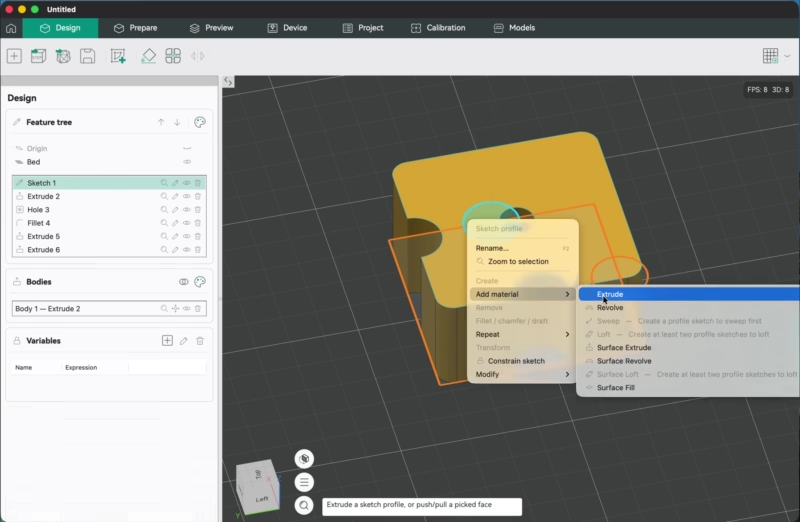
Also new, a texture displacement tool lets you bake preset or your own imported textures and image into the mesh as a real, physical relief. The Design tab goes further still with sketch-based parametric CAD, including STEP import and export, right inside the slicer, so a part can go from sketch to plate without ever leaving Orca. It’s experimental, though, and toggled off by default.
On the hardware front, Orca now supports Bambu Lab’s H2C and A2L, plus mixed nozzle sizes on the H2D and X2D. Per-nozzle extruder variants, another Bambu Studio port, work on any printer.
Belt printing makes the jump from nightly builds too (as did the Design tab), arriving with profiles for the Printcepts BabyBelt Pro, IdeaFormer IR3 V2, plus a generic belt printer profile. These are possibly the most niche of niche printer types, but now a supported niche for Orca Slicer nevertheless. Likewise, IDEX, dual-gantry, or IQEX machines are now catered to more directly with iXex parallel printing enabling the slicer to set up copy and mirror printing modes, letting you print two to four parts per job. This requires a minor amount of effort on your part, mind: you have to supply the mode-switch G-code.
There is a dizzying number of features we can’t squeeze in here, from Precise Seam modifiers to configurable 3MF export (only exporting chosen settings required for the print). It is very much worth a read of the release notes to get a sense of the scale of the new features, toggles and switches that are planned and testable for the slicer.
If you’re not keen on being a test pilot, version 2.4.2 remains the stable release. Alpha builds are available to download for Windows, macOS, and Linux. If you do jump in, do as the notes say and back up your projects and profiles first.
You’ve Read That; Now Read These…

License: The text of "OrcaSlicer to Get Plug-Ins, Color Mixing and Native Parametric CAD" by All3DP is licensed under a Creative Commons Attribution 4.0 International License.