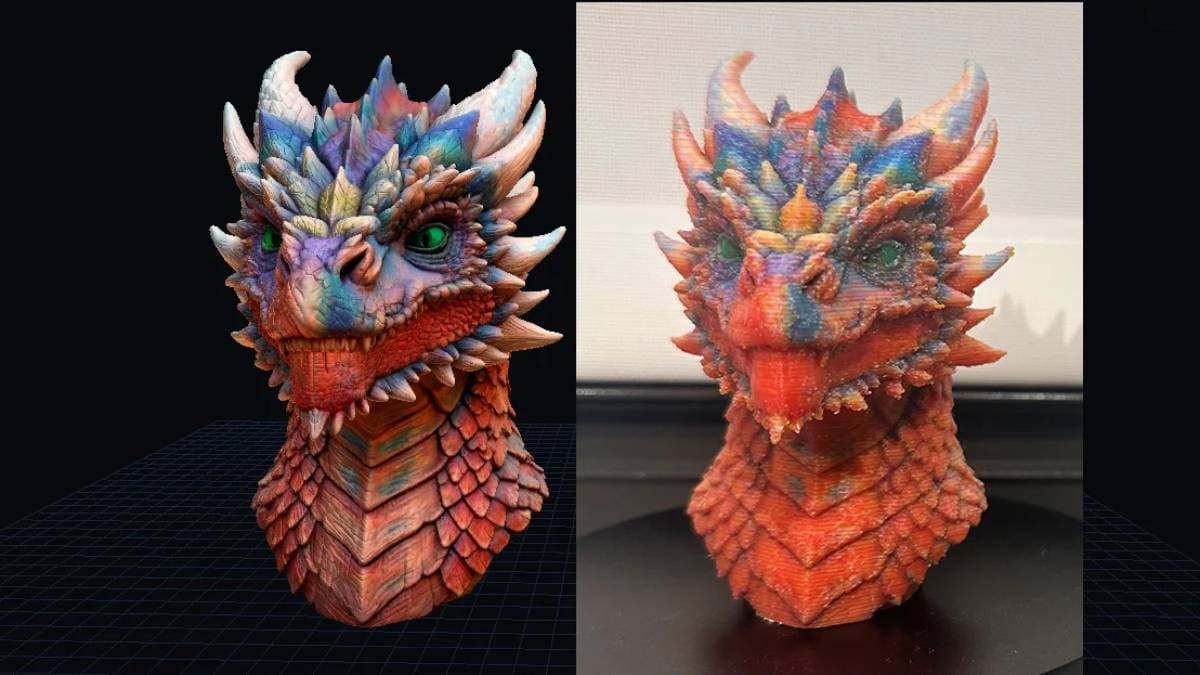
ColorStack Turns Game Assets and 3D Scans Into Full-Color FDM Files for $10

From the brains behind the color interpolation technique known as full spectrum comes ColorStack, a paid-for app that automatically sets 3D printable color data for a CMYW/K 3D print based on texture data.
Color-stack.com is a $10 standalone Windows and Mac application from developers Chase Mussey and Javier Herrera. Designed to help you prepare exceedingly colorful multicolor 3D prints, it takes color texture data – say from a 3D scan, or gaming asset – and translates it into color mapping for your 3D printer to follow, alternating the filament used at each layer.
Sound familiar? There’s a lot of virtual-color printing going around at the moment, much of it stemming from a Reddit thread where Mussey and Herrera first showed off the layer interpolating technique they had been experimenting with. This thread also involved Ratdoux, who successfully launched the technique for a wider audience as the FullSpectrum Snapmaker OrcaSlicer fork, which we tested back in March.
Context: The CMYK subtractive color model from physical print production forms the theoretical basis for this crop of color-3D printing innovation. The important thing to remember is that an expanded range of colors is produced by combining Cyan, Magenta, Yellow, and Key (black), collectively referred to as CMYK. Transparency matters in 3D printing these combinations. Black filament would be too light blocking to work effectively when mixed into other layers, and so white or grey are often used instead to boost the efficacy of the effect.
ColorStack is distinctively different, picking up where the virtual color and gradient creation of FullSpectrum currently ends by automatically converting textured 3D models into cyan, magenta, yellow, white, and black (CMYW/K)-layer sequences for multi-filament FDM printing – effectively “baking” the color texture data onto the model to be printed from CMYW/K-color filaments.
It accepts OBJ files that already carry UV-mapped textures or vertex color data. Think game assets, photogrammetry scans, and image-to-model AI tools – the sorts of files that typically live in digital asset repositories like Fab. Between the OBJ model data and an image file with the texture information, ColorStack runs them through an automated pipeline, converting this RGB data into CMYW/K channel weights, and outputs an OBJ file with each face assigned to a filament material slot. Import that into your slicer, mapping the channels to the CMYW/K filaments on your machine, and print. As with the FullSpectrum slicer, thin layer heights (0.08 mm is the default) are a necessity in order to cram more component colors into the model to give more realistic results.
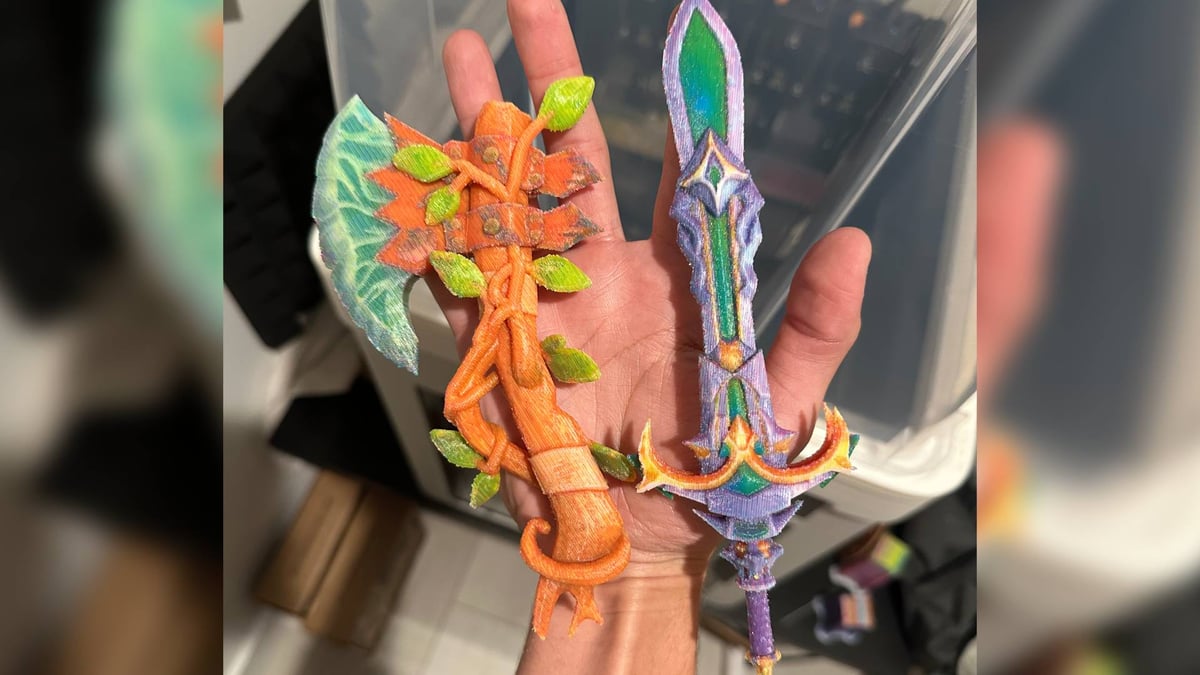
That automated pipeline is the point, eliminating manual in-slicer paint jobs by working with the color data that’s already available for the model.
While version 1.1.0 added the ability to include black in the calculation (expanding the tool from just CMYW to CMYW/K) the current version of ColorStack, 1.2.0, adds OGV – orange, green, and violet channels extending the gamut to better handle punchy oranges, greens, and purples, the creators say.
Of course, the implication there is that you need a 3D printer capable of serving up to eight filament paths cleanly, making a toolchanger like the Bambu Lab H2C the only commercially ready option that comes to mind that can handle the full spread right now.
Mussey told All3DP that additional channels for transparent and silk filaments are in the works, enabling effects like a metallic finish. Right now, the developers recommend Polymaker Panchroma Translucent PLA for the CMY channels, along with Snapmaker Pearl White PLA for the “key” white channel. They tested the tool on a Snapmaker U1.
Limitations are stated plainly on the product page: multi-material meshes with more than one UV map aren’t yet supported, and output files are high-polygon by nature (a mesh reduction option exists for lower-spec machines).
At $10 on Gumroad the barrier to try ColorStack is low. The higher barrier is the hardware: like every tool in this brave new multicolor world, ColorStack needs a nozzle or toolchanging 3D printer to do anything useful without generating mountains of waste. Something like the Snapmaker U1 at $899 handles the base four-color ColorStack printing – to go further, you’re looking at something like the Bambu Lab H2C at $2,399 or, if you can wait for one, the Prusa Core One+ with INDX.
Note that there is web app out there with the same name (at colorstack.app) – Mussey told All3DP there’s no association between the two.
Read more recent news:
License: The text of "ColorStack Turns Game Assets and 3D Scans Into Full-Color FDM Files for $10" by All3DP is licensed under a Creative Commons Attribution 4.0 International License.