This Free App Puts Live Prusa Print Status in the Mac Menu Bar

New unofficial Prusa MacOS desktop app brings your locally connected 3D printer directly to your Mac’s status bar, giving you at-a-glance updates, webcam feed, and even one-click Home Assistant triggers right from your desktop.
I love my job sometimes, because talented folks reach out to us with surprising and delightful things they’ve made, and I can then shine a spotlight on that and share it with you to, hopefully, share in my surprise and delight.
The newest thing to have my head bobbing in approval is the clean, crisp, Prusa StatusBar app – a tangible example of why a manufacturer keeping their software and hardware open to the user is just a decent idea: industrious folks from outside the company fill the gaps with things like this, and everyone benefits. Developed by Pierre Mavro, this app taps the PrusaLink API and repackages what it can relay, along with other goodies, into a free, native MacOS menu-bar app that you can call up directly on your desktop.
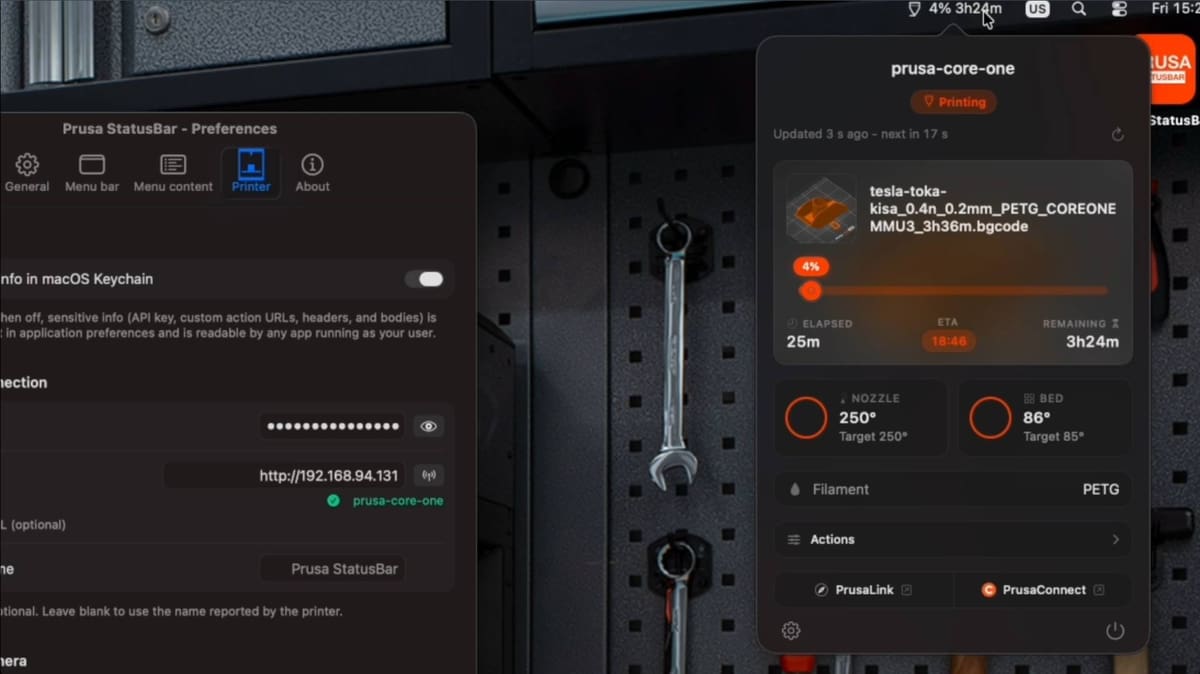
Pulling live print status and information about the printer, it’s a lean, lightweight tool that, for Mac users, enhances your experience using a Prusa Research 3D printer, particularly if you’re not one to bother with Prusa’s smartphone app while you’re at your computer. To set it up, all you need is the printer’s IP address and API key.
The closest alternative to this would be Prusa’s own MacOS app, which is listed as available on “iOS/MacOS” but is ultimately an iPad app running on Apple Silicon Macs via Apple’s iPad-app compatibility. The fussiness of this is that it’s a discrete application running in a window, and requires you to log in in order to see your printer.
With Prusa StatusBar, once installed and connected to your printer, you just unfold the menu bar into view and you get a clean overview of the printer and what it’s up to, including the job name, progress, temperature readouts, plus live camera feed (including Prusa’s Buddy cameras through a bundled go2rtc relay). Mavro went further with configurable webhook buttons to interact with other elements of your home network, such as smart plug control, LED lighting, or ventilation routines at trigger states (such as a print starting). In practice, that means one-click triggers for Home Assistant automations.
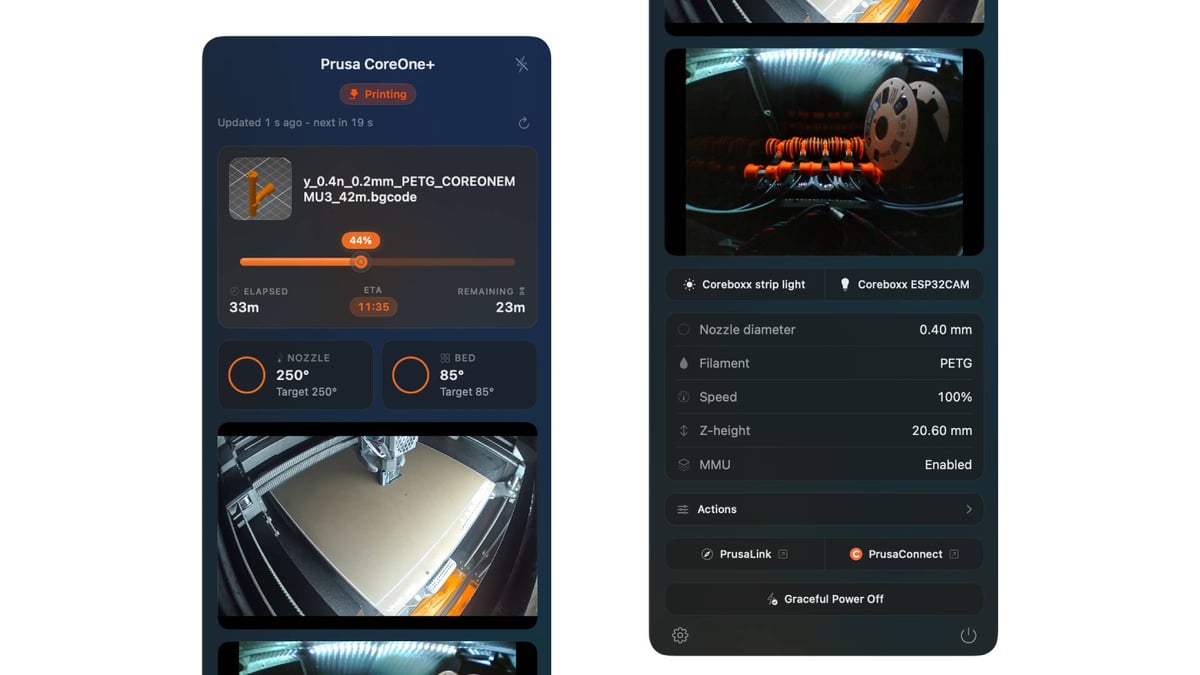
None of this natively exists in Prusa’s official apps, though the company does encourage experimentation through accessories such as its GPIO board, which extends hardware control from the printer itself. It’s a significant project that ups the quality of life for Prusa hardware owners on Mac.
Mavro wrote the app in Swift, signed with an Apple Developer ID, and notarized, meaning it clears MacOS’s malicious-software-screening Gatekeeper at the first hurdle. Any Prusa Research 3D printer with PrusaLink integrated is compatible – basically every modern machine the company sells. The minimum system requirement to run Prusa StatusBar is macOS 14 Sonoma.
The project launched May 10 and received several updates since, with v1.1.0 adding a detachable floating window mode. The leading feature request, Mavro tells All3DP, is the ability to track multiple printers through the same instance. “Regarding what will come next, it’s simple, the project is on GitHub, so anyone can freely create a feature request and I’ll take it into account.”
A Windows version is not in the works, however Mavro is hopeful the project inspires the community to make it happen.
Prusa StatusBar is available to download from GitHub, or installed using Homebrew. I highly recommend watching the video on the GitHub page to get a sense of how nicely put together this app is.
Read more recent news:
License: The text of "This Free App Puts Live Prusa Print Status in the Mac Menu Bar" by All3DP is licensed under a Creative Commons Attribution 4.0 International License.