
Massive OrcaSlicer Update Lands with Z Anti-Aliasing, Stronger Gyroid Infill, and a Cloud of Its Own

OrcaSlicer hit version 2.4.0 alpha on May 25, with a release that bundles a handful of welcome new features alongside something more strategically significant: Orca Cloud, the project's own centralized profile and synchronization platform.
Is there a better feeling than a slicer update that adds actual new features? I’d argue no, but then again, maybe I’ve been doing this so long and should go outside to touch grass a little.
The feature list is long for OrcaSlicer 2.4.0, with the release notes counting something close to 100 changes in total. Many are bug fixes, yet some 3D printing newness stands apart. The release is currently available in alpha, meaning it’s not finalized yet, so only download and use if you simply can’t wait for the stable release and can live with the risk of instability.
Z anti-aliasing (otherwise known as “ZAA”) makes its debut. With origins as a research technique, later a community proof of concept by contributor Aleksandr “Adob” Dobkin and others, this resolution-altering adaptation works by variably changing the Z position of top surfaces to more closely match the original mesh. The result is softening of the visible stair-stepping you typically get on shallow slopes – the slice will reach for small amounts of variable Z values to fill in gaps typically left empty in stair-stepped parts of prints. CNC Kitchen demonstrated the technique to great effect earlier this year, showing measurable surface roughness improvements.
Strength gains for Gyroid infill lands with this update, too, with claims up to 60% compressive strength improvement when you use the new experimental “Optimize gyroid wave” option. This development is attributed to a Brown University/NASA Space Grant program in collaboration with Elegoo and Polymaker.
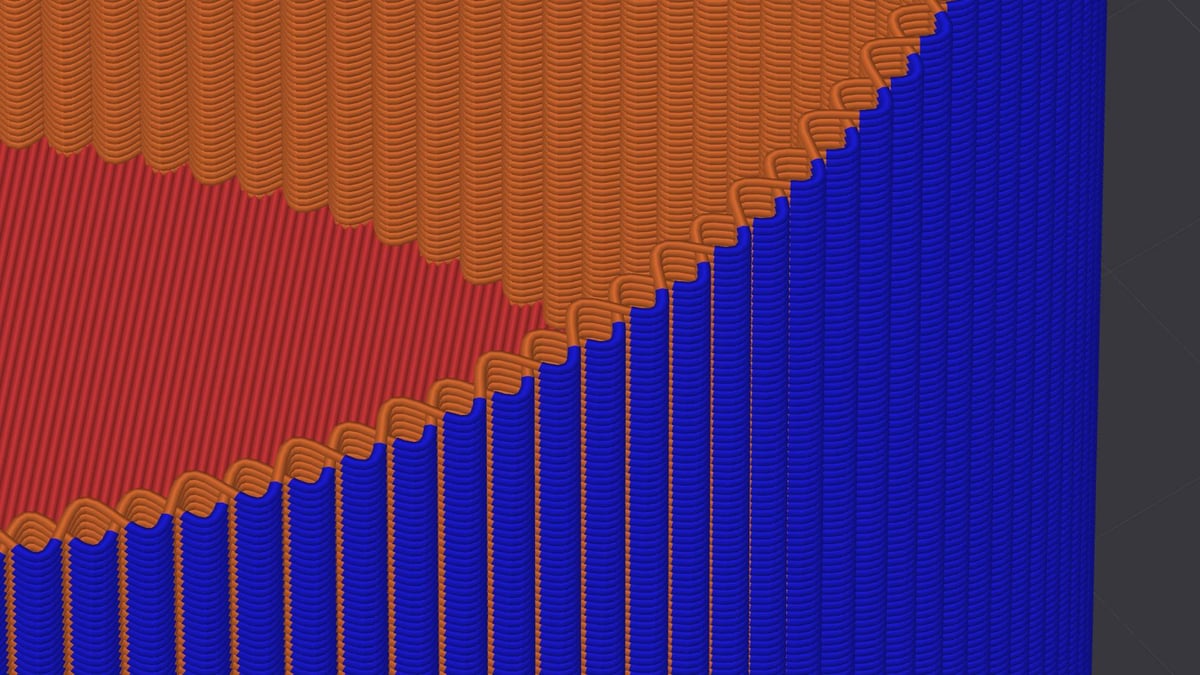
Fuzzy skin mode evolves with the addition of a new “Fuzzy skin ripple mode”. Rather than the random dithering that fuzzy skin typically achieves, this ripple mode adds a knit-like texture with amplitude and frequency control baked into it.
Among other additions, there’s also new logic for combining brims neatly around clusters of parts on the bed, native Wayland on Linux, in-slicer machine input shaping, and a UI update that adds Expert user mode that better gates advanced settings behind a deliberate toggle.
A New Chapter for OrcaSlicer
Arguably the biggest change, though not something that’ll directly impact your printing, is the addition of Orca Cloud – OrcaSlicer’s new unified profile and parameter service, syncing vendor and user-generated printers, filaments, and quality profiles across devices.
Orca Cloud (cloud.orcaslicer.com) is live now. It is “the first infrastructure milestone for the broader OrcaSlicer ecosystem” lead maintainer (and founder of OrcaSlicer Pte. Ltd.) SoftFever tells me. “The 3D printing industry is becoming increasingly fragmented. We have seen cases where OrcaSlicer is forked in ways that do not fully respect the AGPL license or where printers are locked to vendor-specific forks. That does not help the community or the industry.”
A new independent component of the Orca Slicer ecosystem, Orca Cloud is a space for users and vendors to bundle and distribute presets for machines, materials and printing profiles. Right now, you can “follow” other users’ bundles – printing profiles – as well as leave comments and view details about printer and OrcaSlicer version compatibilities.
“Our goal is the opposite [[of a fragmented industry]]: an open, vendor-neutral ecosystem where makers, users, contributors, and hardware companies can all benefit. Orca Cloud is the first step toward that.”
“It is intended to connect profiles, workflows, users, and eventually hardware/software partners in a vendor-neutral way. Orca Cloud currently has no paid features, and our goal is to keep the core personal-user experience free. In the future, we may introduce value-added features so the company can be sustainable, but we want to do that without taking away the open-source slicer or basic user workflows.”
The release didn’t pass 100% hiccup free, with the initial Terms and Conditions text for the service indicating training of AI models and machine learning (ML). When asked about it, SoftFever clarified “Orca Cloud does not currently train AI or ML models on user content. The previous AI/ML wording came from the placeholder terms and should not have been published. Since we are not training models on user content today, there is no opt-out to surface in the product.”
In October last year the project evolved, incorporating in Singapore. “I decided to work on OrcaSlicer full-time and set up OrcaSlicer Pte. Ltd. because I believe this is the most sustainable way to keep the project moving forward. OrcaSlicer has grown far beyond what I can support as a personal hobby project.”
Now a for-profit venture, OrcaSlicer as an organization has changed in nature, though any fears of a fundamental change to the OrcaSlicer software should be allayed: “OrcaSlicer itself is, and will remain, open source. We have no plan to put the core slicer behind a paywall.” The way things are being framed, any future premium or monetized features would be optional, with the (since rewritten) terms stating the company reserves the “right to introduce optional paid features or premium tiers in the future.” There’s no concrete information on what shape this may take, but SoftFever tells us “the direction is to build around OrcaSlicer, not to lock it down.”
The OrcaSlicer 2.4.0 alpha is available to download for Mac, Windows, and Linux. Visit the OrcaSlicer website for more.
Read more recent news:
License: The text of "Massive OrcaSlicer Update Lands with Z Anti-Aliasing, Stronger Gyroid Infill, and a Cloud of Its Own" by All3DP is licensed under a Creative Commons Attribution 4.0 International License.