Prusa’s EasyPrint App Can Now Send Jobs to Non-Prusa Printers, Except for Bambu Lab

Prusa Research’s effort to make the act of 3D printing ultra-convenient took a big step forwards recently with an update to the company’s EasyPrint service enabling connection to some third-party printers. Just don't expect it to work with your Bambu Lab machine anytime soon.
A video posted two weeks ago to the Prusa 3D YouTube channel details EasyPrint’s new compatibility with third party printers. Currently experimental, the integration enables EasyPrint to send and start print jobs on supported, locally networked printers using any of the PrusaLink, OctoPrint, Klipper (Moonraker), CrealityPrint or ElegooLink protocols.
The update makes good on a teaser Josef Průša gave back at the launch of EasyPrint in February.
Adding convenient cloud-based slicing for Printables and Prusa App users, EasyPrint presents an alternate workflow to the typical experience of downloading files and manually slicing them in PrusaSlicer. Providing you have a networked Prusa 3D printer on your account ready to receive the G-code, you can go from a Printables model page to having the file on your machine and printing in no time, no slicer required. Alternatively you can access the EasyPrint environment directly on the Printables website and use it directly as a web-based slicer.
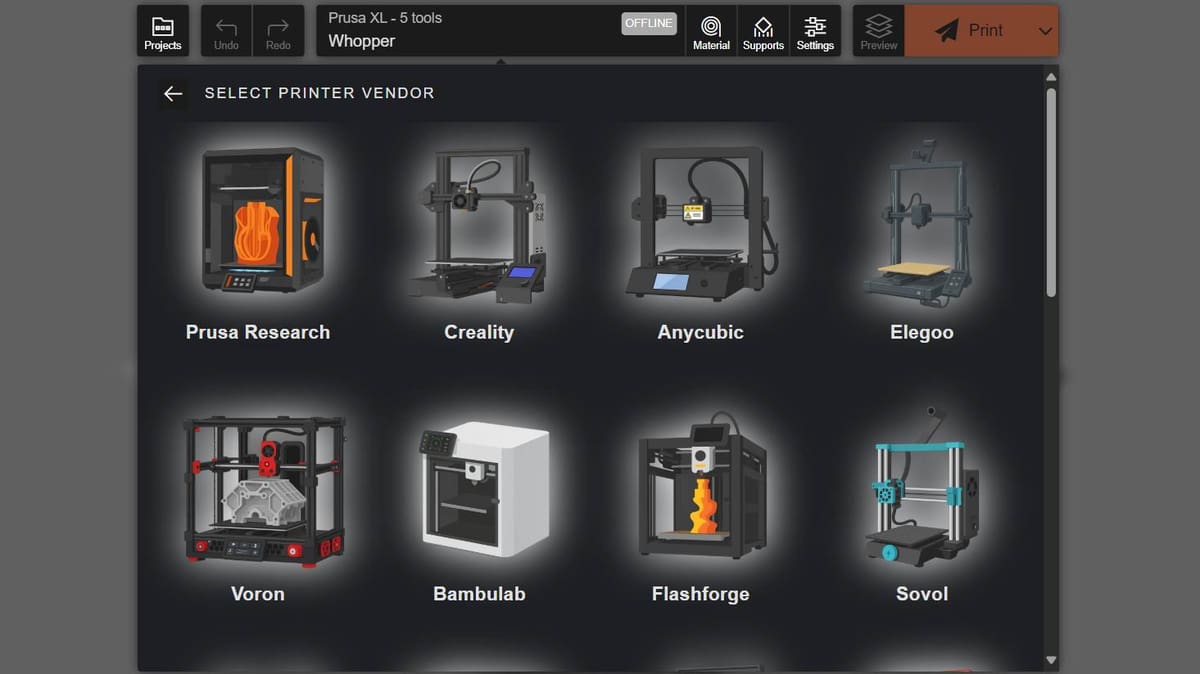
As a result of the change, EasyPrint now lists 21 other brands’ printers, including Creality, Elegoo, Anycubic, Qidi, Flashforge, Sovol and, cynically, Bambu Lab. Given Bambu Lab’s changes earlier this year to how networking for its printers works (or rather, doesn’t) for third-parties, there is no apparent way to actually send print jobs to local Bambu Lab machines through EasyPrint, despite EasyPrint listing the printers.
Taking it for the dig at Bambu Lab that it probably is, when asked about it, a Prusa representative told All3DP that the moment Bambu Lab provides an API or alternate method to make it work, the Printables team would “implement it immediately”. So the proverbial ball is in Bambu Lab’s court, though we suspect they’re not even playing the game.
Since publishing this article Prusa has pointed out to us that, alternatively to the remote send, you can download the prepared G-code and ferry it to the device by hand instead. In that regard, yes, EasyPrint does work for Bambu Lab machines.
In a Pinch, It’s Quick and Convenient
Obviously, we had to try it. Checking the feature out with a Creality K2 Plus we have on deck, one of the dozens and dozens of printers now listed in EasyPrint, the process for connecting was functionally flawless. Choose the relevant connection type – in this case CrealityPrint – and punching in the printer’s IP address was all it took. From there, you can assign the printer a name, load a model, prep the print job as you would using a Prusa 3D printer in EasyPrint. You can choose to upload the file to the printer if you want, or just hit print. It works.
Functionally EasyPrint is pretty similar to cloud slicing and printing in other manufacturer’s ecosystems. As far as we’re aware though, Prusa Research is the first manufacturer to open the door to other manufacturer’s machines, giving it the edge for Prusa account holders with multiple machines spanning brands.
Slicing happens on Prusa’s servers, meaning the chosen file is uploaded there and sliced in system’s backend using PrusaSlicer. You can customize the print quality (and speed) through layer heights, change the wall and top/bottom parameters, change the infill density and choose an infill pattern. Material choice is vast though, oddly, not synchronized with PrusaSlicer. Support structures and adhesion helpers can also be configured here, and it’s all packaged up in a big-buttoned, mobile-friendly UI, which makes tapping your way through pleasantly uniform experience across devices.
Update September 25, 2025: Added a line about downloading the G-code to physical media and using that with a Bambu Lab machine.
Read more recent news:
- You've Been Calculating 3D Printing Costs All Wrong, A New Study Found a Better Way
- The Acmer X1 Is a 3-in-1 Laser/CNC Machine Getting Big on Kickstarter – Here's Why
- Come Rain, Shine or Snow: The Best 3D Printing Materials for the Outdoors
Tired of Reading? Try Listening
License: The text of "Prusa’s EasyPrint App Can Now Send Jobs to Non-Prusa Printers, Except for Bambu Lab" by All3DP is licensed under a Creative Commons Attribution 4.0 International License.