
How This Free AI ‘Co-Pilot’ for Fusion (Soon for SolidWorks) Slashes Design Times by 60%

This free AI assistant for Fusion, with a SolidWorks version on the way, claims to slash the number of clicks in designing a part by 75%. Will it actually deliver on those big productivity promises?
AI’s promise to automate the ‘grunt work’ of CAD is starting to show measurable results. According to recent data from Hestus, users of its free Sketch Helper assistant for Autodesk Fusion are now completing designs up to 2.5 times faster. While the company teases a looming expansion into SolidWorks, the latest update focuses on a rapid-fire suggestion engine that underscores how quickly AI-assisted modeling is moving from novelty to standard workflow.
As we reported last year, the company aimed to reduce the grind of constraint management and repetitive sketch setup in Fusion. Since then, Sketch Helper has evolved from an intriguing AI add-in into a more refined, metrics-backed productivity tool, offering suggestions on average every nine seconds
That last number is particularly telling. Sketch Helper isn’t just occasionally chiming in, it’s acting as a near-constant co-pilot during active sketching sessions.
The tool is available as a free extension for Autodesk Fusion and works with both the free and paid versions of the software. Users can install it via the Fusion App Store or directly through Fusion’s extension workflow, then simply open a sketch to get started.
And yes – it’s still free.

In the latest release (version: 1.1.0), Hestus added some new features and function to the tool.
- Symmetry Recommendations: Sketch Helper can now propose symmetry axes and automatically recommend symmetrizing geometry around them. It can also use existing axes to suggest symmetry-preserving tweaks, making intentions explicit rather than manual.
- Chain Mirror: An improvement on the original Mirror tool, Chain Mirror detects existing symmetry and mirrors entire chains of curves in a single click, addressing a top user request and reducing repetitive manual mirroring.
- HV Circles Alignment: A new recommendation that aligns circular features horizontally and vertically – even if they vary in size or spacing – and inserts construction lines to aid dimensioning and visual relationships.
- Improved Dangling Points Fixes: The update boosts how Sketch Helper deals with open geometry. It now proposes connecting dangling points to nearby curves or other points so profiles close cleanly and it supports connecting points/curves directly to the origin, helping ensure sketches are properly anchored and constrained from the start.
What It’s Actually Like to Use
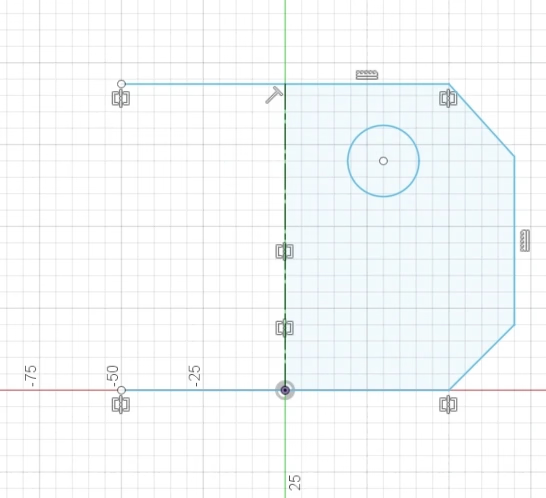
Let’s be clear: if Autodesk Fusion intimidates you, Sketch Helper won’t magically turn it into beginner-friendly CAD. You still need to understand how sketches, constraints, and dimensions work. But if you already know your way around Fusion, Sketch Helper can shave off minutes – potentially hours – by intuitively guessing what you’re about to do next and offering it up as a one-click suggestion.
As an designer or engineer, you usually know your next move: define dimensions, establish symmetry, add constraints. Fusion sketching is famously click-heavy: Click to select a tool, then click and drag to draw, then click to dimension, then click to constrain … over and over. Sketch Helper reduces that maddening friction. As soon as you begin sketching, suggestions appear like autocorrect on your text. You can accept suggestions with a click and they’re instantly applied, or reject them just as easily.
Sketch Helper can “see” what you’re drawing and infer design intent. Draw one hole on a face, and it may suggest mirroring it across a plane. Sketch a profile that looks like it needs symmetry? It outlines the counterpart.
In practice, here are just some of the suggestions the tool provides:
- Reminds you to define dimensions
- Notifies you when a sketch becomes fully defined
- Suggests adding centerlines
- Detects when geometry should likely be symmetrical
- Outlines mirrored features (like symmetric hole placements) so you can simply accept instead of recreating them manually
Since the tool is still adding features, Hestus is taking user feedback and there’s even a built-in bug icon that opens a feedback form directly inside the tool.
Hestus has also published broader engagement metrics suggesting users accept suggestions frequently during design sessions. If accurate, that level of interaction points to growing trust in the AI’s recommendations, which is a crucial hurdle for any engineering tool.
SolidWorks Is Next
While Sketch Helper currently runs inside Fusion, Hestus has confirmed that a version for SolidWorks is in development. If executed well, that move would bring the AI assistant into one of the most widely used professional mechanical CAD environments.
For now, Fusion users get first access to the evolving toolset.
For now, to be clear, Sketch Helper doesn’t make Fusion easy. It makes Fusion faster for experienced users, and that distinction matters. Instead of wrestling with repetitive constraints and symmetry operations, you’re effectively reviewing and approving them.
If Hestus’ reported speed boost and click reduction hold true across broader workflows, Sketch Helper may be less of a novelty plug-in and more of an early glimpse into AI-augmented CAD becoming standard practice.
You May Also Like:

Listen to All3DP’s News Podcast:
License: The text of "How This Free AI ‘Co-Pilot’ for Fusion (Soon for SolidWorks) Slashes Design Times by 60%" by All3DP is licensed under a Creative Commons Attribution 4.0 International License.