Meshy 7 Wants to Put an End to Five-Legged Unicorns

Meshy’s latest image-to-3D AI engine is all about alignment, making the generated model actually resemble the image you fed it before you get to the mesh.
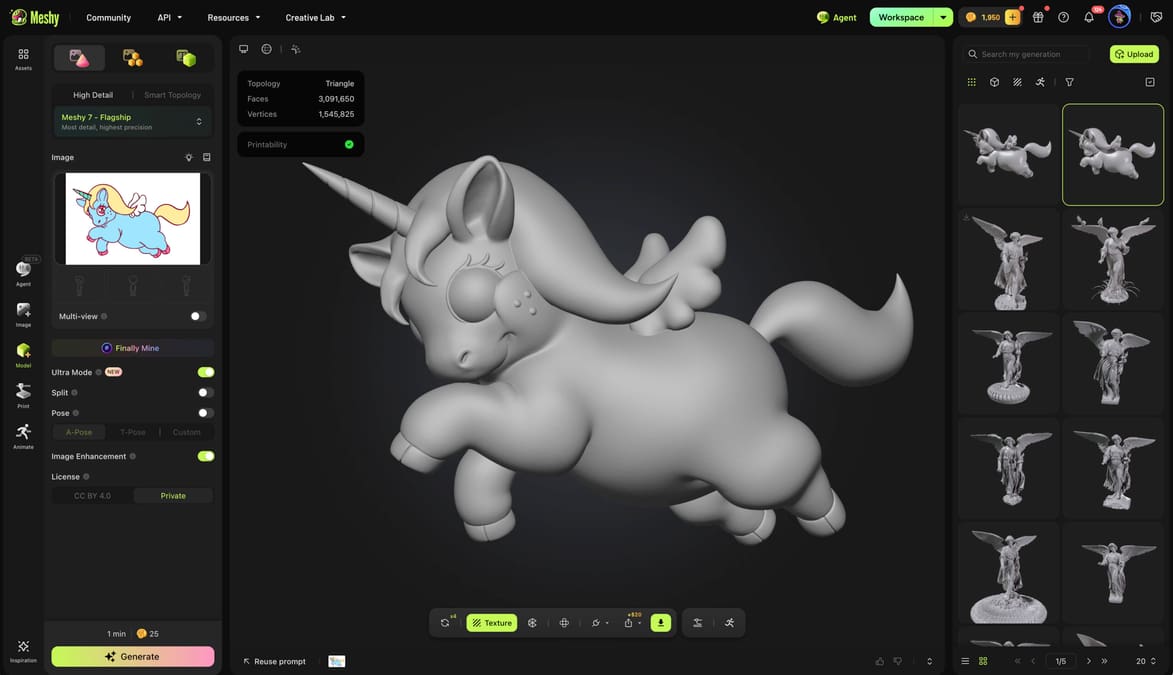
If you remember our encounter with Meshy 6 earlier this year, you may also remember some of the things it got wrong. Five-legged unicorns have a way of sticking in the memory, as does a generated statue that looks close to the reference, but not quite close enough.
Apparently, Meshy remembers, too.
The company has now released Meshy 7, its successor to Meshy 6, and the centerpiece of the update is what it calls geometry alignment: not simply generating a plausible-looking 3D object, but generating one whose proportions, component placement, and small surface features actually correspond to the reference image. Meshy 7 became generally available on August 10.
That might sound like a subtle distinction, but it addresses one of the stranger problems with current image-to-3D tools. An AI can hand you a perfectly recognizable chair, character, statue, or mechanical object while simultaneously getting your chair, character, statue, or mechanical object wrong.
For Meshy 7, the company says it has made matching the source image a primary target rather than treating a valid-looking mesh as the finish line.
The same unicorn drawing fed into Meshy 7 (above) has far better proportions.
Looking Harder at the Picture
Meshy says there are three major changes behind the new version.
First, Meshy 7 has a revised image encoder capable of examining features at multiple scales and accepting higher-resolution input, with the aim of retaining smaller shape cues from the original picture. Second, Meshy says it rebuilt its training data to more precisely pair images with their target geometry while reducing the influence of things such as lighting, backgrounds, and visual style. Finally, geometry alignment itself was incorporated into the evaluation loop used while training the model.
In practical terms, Meshy is trying to improve the model at three scales.
There is overall proportion – whether the broad silhouette and major masses are correct. Then there is spatial distribution, which asks whether individual pieces of geometry are actually sitting where they should. Finally, surface detail looks for smaller discrepancies such as missing ridges, invented bumps, or details from the reference that have been smoothed away.
Those last two are particularly relevant to the sorts of models you might want to 3D print. A model can be manifold, watertight, and technically printable while still having a handle in the wrong place, a facial feature distorted, or embossed decoration turned into mush.
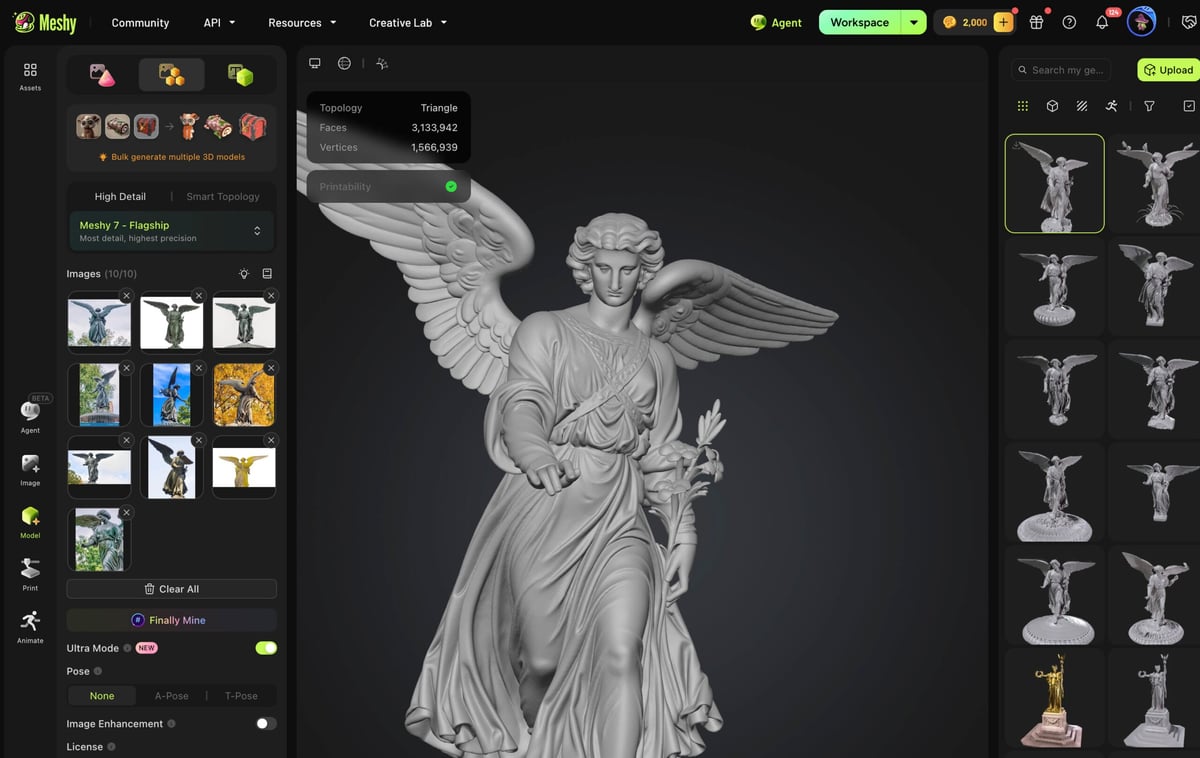
We haven’t take Meshy 7 for a deep dive, but our cursory trial of the multi-image to 3D model feature showed improvement over Meshy 6. Last March when we uploaded several images of Munich’s Bavaria Statue to create a 3D model, some had absolutely laughable faults, like two heads and ballooned proportions. Others though we’ve very close and printed really well.
Today, our models didn’t have those obvious faults. We uploaded 10 photos of various angles (front, back, side, etc.) of the “Angle of the Waters” statue by sculptor Emma Stebbins that stands atop the Bethesda Fountain in New York City’s Central Park. Again, the results were impressive, but not perfect, which may be too much to ask at this stage of the AI game. While the statue’s clothing and props were rendered the best, the face felt like AI was filling in some blanks not apparent in our photos with generic “statue face.”
Meshy Built Its Own Test
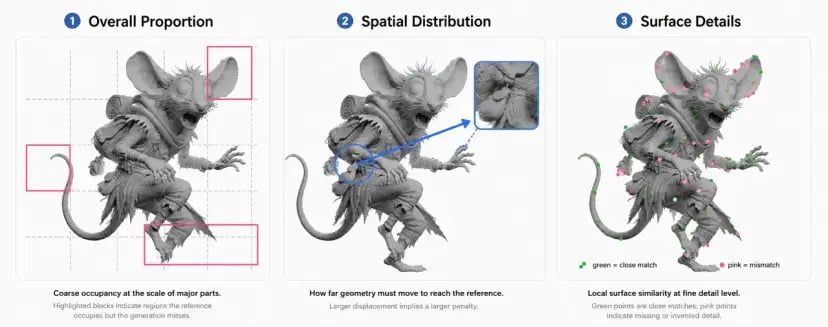
Rather than simply showing a prettier set of cherry-picked generations, Meshy has also introduced its first automatic 3D geometry alignment benchmark.
The company starts with reference 3D models it says were excluded from training, renders images of those models from known camera positions, feeds those images into the generators being tested, and then compares the resulting geometry with the original 3D reference. Generated models are aligned using translation, rotation, and uniform scaling, but not stretched independently along different axes, which would disguise incorrect proportions.
On Meshy’s own numbers, Meshy 7 leads the models it tested on all three metrics when working from a single elevated “top-quarter” image. It scored 81.0% for overall proportion, 79.7% for spatial distribution, and 59.8% for surface detail. Meshy does not name the competing systems in the published table, instead labeling them T1, H1, R1, and H2.
The picture becomes less decisive with four reference views. Meshy 7 scores 84.4% for proportion, 81.8% for spatial distribution, and 60.6% for surface detail, but competitors beat it in two of those three categories. Meshy itself notes that the strongest models fall into a fairly narrow range once they have multiple views to work from.
So, yes, there are impressive-looking numbers here – but they are Meshy’s benchmark, run and reported by Meshy. The company says the benchmark will be made available separately, which should make its claims considerably more interesting to evaluate once others can put the methodology through its paces.
And, naturally, our preferred benchmark still involves giving the software something awkward and seeing what comes out.
Faces, Gears, and Tiny Dragons
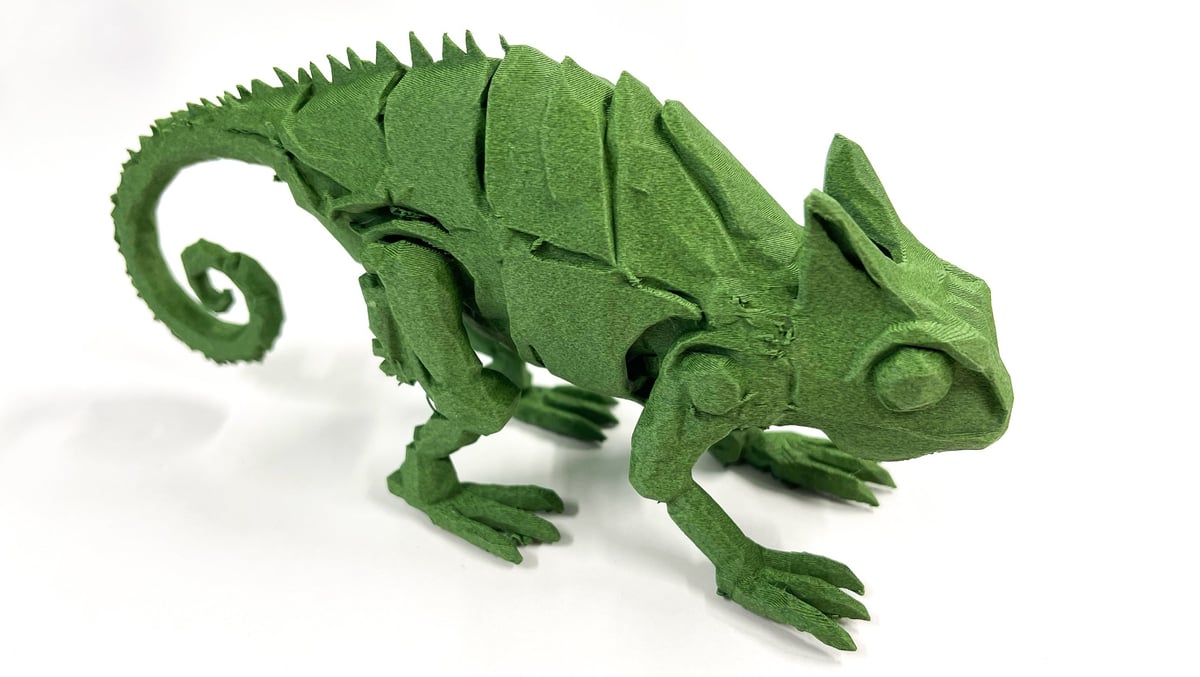
Meshy highlights several cases where it thinks the new model performs especially well.
One set of examples involves faces, where it claims Meshy 7 can preserve not merely a generic likeness but differences in expression through geometry, such as changes around the mouth, eyes, cheeks, and brow. Another example uses a mechanical owl packed with layered panels, gears, thin legs, and other components to demonstrate improved placement of separate features perhaps inspired by the mechanical chameleon we used to test Meshy way back in June of 2025 (shown above).
Perhaps more interesting for printing is a jade-style coin covered in shallow relief. Meshy says the model preserves the coiled dragon around its edge, separated cloud forms, and a raised central character rather than reducing all of that small-scale structure to surface noise.
Meshy is also unusually forthcoming about two things Meshy 7 still dislikes: very thin structures and exact repetition. Loose strands of hair can merge into thicker ribbons, while repeated architectural features such as identical floors and windows may gradually drift out of alignment.
So perhaps keep the Rapunzel figurine and scale model of a perfectly repetitive office tower in the test folder.
From Picture to Printed Parts
Meshy is also positioning the improved generation model as the first step in a larger 3D printing workflow.
This part needs a small qualification: features such as Auto Split and Multi-Color Print are not all new with Meshy 7 itself. Auto Split, for example, was announced in July. What Meshy is arguing now is that better input-to-geometry alignment makes the whole pipeline more useful: generate the model from an image, divide it into printable pieces, prepare its colors, and send the result toward a slicer.
Auto Split is designed to cut complex geometry into watertight components and arrange them for printing, while Meshy’s multicolor tools can produce color information intended for workflows including Bambu AMS, Creality CFS, and OrcaSlicer. Meshy also supports STL and 3MF in its print workflow.
That end-to-end pitch is arguably more interesting than any one AI-generated model. Image-to-3D systems are easy to demonstrate with a rotating render; producing something you can actually put on a build plate without spending the afternoon repairing and remodeling it is a considerably higher bar.
Time for Another Unicorn?
Meshy 7 is available to registered users now. Anyone with an account can generate with it, although Meshy says downloading models created with Meshy 7 requires a Pro subscription or higher. (Our downloadable models, this time, were huge, detailed, and had no mesh-errors.) Meshy 7 also supports multi-view input, while its Ultra Mode is limited to single-view generation at launch, with multi-view Ultra support promised later.
As competition heats but between Meshy, Hi3D, and Tripo, it’s a race to capture the workflow that enables users to go from idea to physical object as quickly, easily, and accurately as possible.
License: The text of "Meshy 7 Wants to Put an End to Five-Legged Unicorns" by All3DP Pro is licensed under a Creative Commons Attribution 4.0 International License.