CAD for Coders: HelloTriangle Is a New Python-Powered, Browser-Based 3D Modeling Platform

Forget complex menus and click-heavy CAD. A former Materialise engineer built this tool to let you script, analyze, and repair 3D meshes right in your browser.
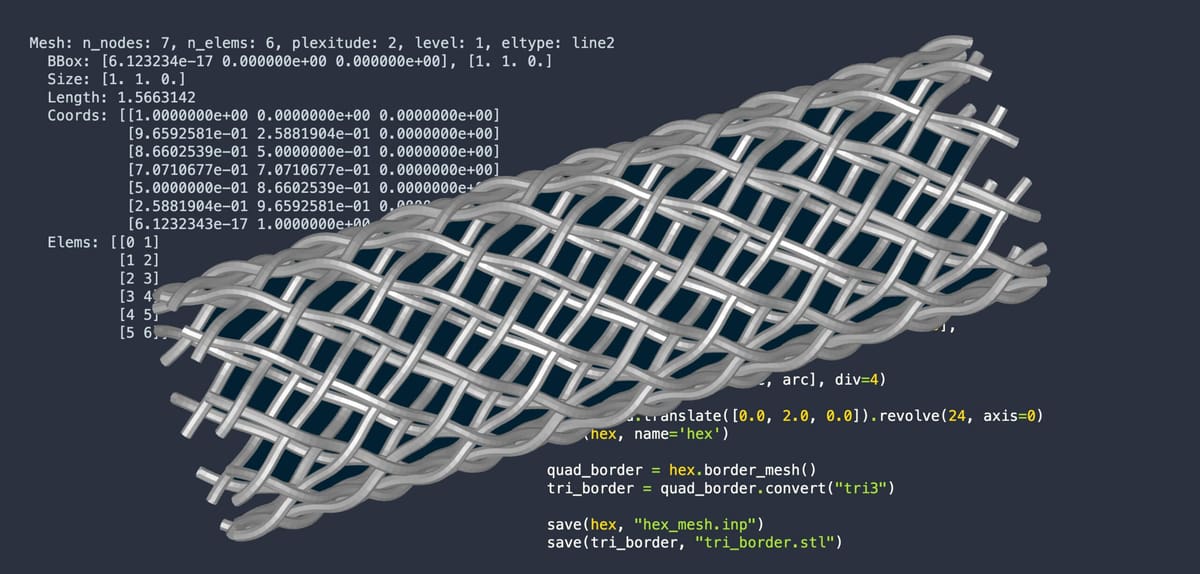
A new browser-based tool called HelloTriangle from a start-up of the same name, wants to change how people create and share 3D models. Instead of relying on complex software installations or click-heavy CAD interfaces, HelloTriangle uses Python scripting to let users build, edit, and analyze 3D meshes directly online. Created by former Materialise engineer Peter Mortier, HelloTriangle aims to be the CAD for coders.
Unlike traditional CAD tools, such as Autodesk Fusion 360 or SolidWorks, which rely on complex menus and often locally installed software, HelloTriangle runs entirely in the browser. Instead of sketches and surfaces, users type short Python scripts to define shapes and operations, and instantly see the results in an interactive 3D viewer. This is an approach HelloTriangle says is more lightweight, repeatable, and easy to share.
While it’s built with engineers and researchers in mind, HelloTriangle’s developers say it’s designed to be approachable even for beginners. We’ve taken a look, and estimate that you do need to be comfortable with basic Python scripting, although it’s more coding-lite compared to full engineering software development.
It could be particularly useful for people who want to automate repetitive geometry tasks, generate parameterized models, or analyze hundreds of meshes programmatically, such as in simulation, 3D printing preparation, or research.
Tutorials and example scripts show how to create cylinders, lattices, or meshes for simulations like FEA (finite element analysis) or CFD (computational fluid dynamics). The code-based approach also makes workflows repeatable and parametric—change a few numbers in the script, and your model updates automatically.

HelloTriangle squarely fits into the world of computational design (also called programmatic or algorithmic modeling), where you use code or logic to define geometry — instead of manually drawing shapes. It’s similar in spirit to tools like Grasshopper for Rhino, OpenSCAD, or Dynamo for Revit, which also rely on parameters and rules instead of pure mouse input. The key difference is that HelloTriangle is browser-based and mesh-oriented, not solid-CAD-based. It focuses on triangle meshes (like STL files used in 3D printing and simulation) rather than NURBS or BREP solids used in traditional CAD.
Beyond modeling, HelloTriangle includes tools for mesh repair, slicing, and measurement, making it useful for 3D printing and digital fabrication. Because it’s script-driven, users can automate repetitive geometry tasks or analyze hundreds of models in a fraction of the time.
In short, at $29 a month, HelloTriangle may bridge the gap between coding and CAD giving anyone with a bit of curiosity and patience a new way to think about 3D design.
You May Also Like:

License: The text of "CAD for Coders: HelloTriangle Is a New Python-Powered, Browser-Based 3D Modeling Platform" by All3DP Pro is licensed under a Creative Commons Attribution 4.0 International License.