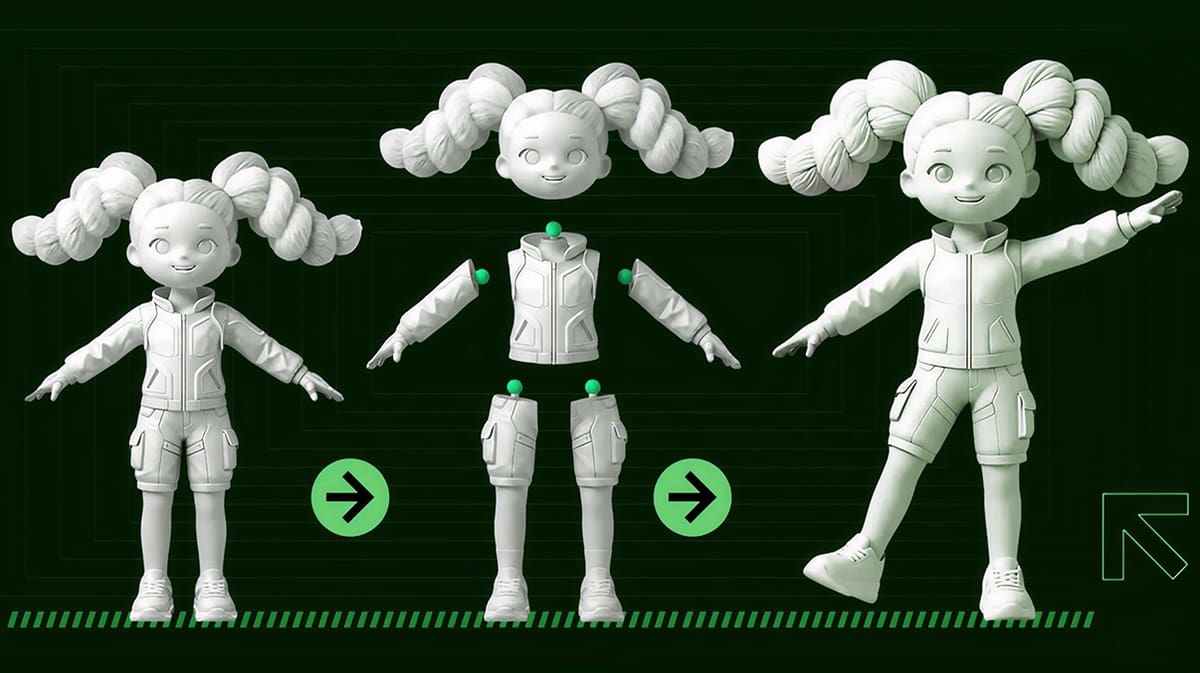
90% Faster Modeling-to-Print: Celebrate Hi3D’s 1st Anniversary with an Exclusive Look at Version 3.0

Launching soon, Hi3D 3.0 streamlines the AI-to-print workflow with new automation tools for model splitting and more, plus anniversary discounts of up to 80%.
Every maker knows the frustration of generating a beautiful AI model, only to realize it’s a technical nightmare to print. It’s too big for your build plate, the mesh is full of errors, and painting multicolor partitions by hand takes hours. What looks flawless on screen often turns into a grueling detour in the slicer.
Hi3D calls this the “last mile” problem of AI 3D creation, and its Hi3D 3.0 platform upgrade, which launches in the near future, is built to cross it.
Timed with its first anniversary, the update transitions Hi3D from a visually focused AI model generator into an all-in-one, end-to-end maker platform that automates the entire workflow, from model generation to final build plate arrangement.
On top of that, Hi3D is rolling out an anniversary campaign offering selected plans at up to 80% off, so you’ll have a low-friction entry point to test the new workflow for yourself.
Split-to-Print: Take Your Model Off the Screen
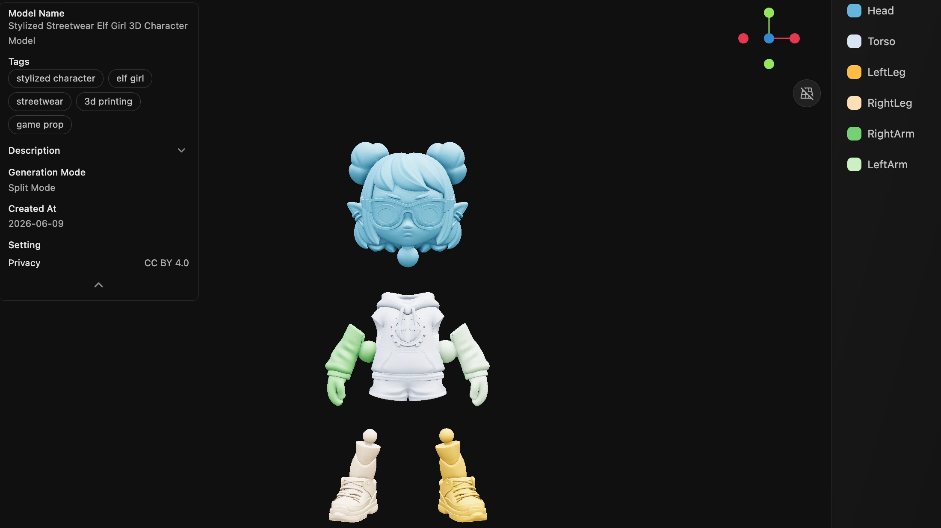
The centerpiece of the upcoming Hi3D 3.0 upgrade is Split-to-Print. The feature is designed for 3D printing makers, collectible creators, model studios, hobbyists, and print service providers who need to print larger or more complex models that may not fit on a single build plate or require assembly after printing.
Instead of relying on manual splitting in your slicer software, complex modeling software, or repeated trial-and-error, you’ll pick a split template and walk away with printable, easy to assemble models for parts in roughly two minutes. The system currently features two dedicated modes:
- Character Mode: Tailored for figures, humanoid models, and collectibles. The system auto-identifies character structures and splits the head, torso, and limbs across six templates, so you can prepare character-based models for printing and assembly with no modeling skills required.
- General Mode: Built for non-humanoid models such as buildings, vehicles, mechanical parts, props, and display objects. This mode gives broader model categories a clean, accessible path straight to the print bed.
Both modes support adding connectors after splitting, which is especially helpful for makers who need parts to assemble cleanly and reliably off the printer. Connectors like snap-fits, mortise joints, and ball joints are generated automatically with tolerances baked in. If you’re an advanced creator who needs exact control, connector type, direction, size, and length are all fully tunable through Hi3D Studio.
Color-to-Print: What You See Is What Prints
Multicolor FDM printing is powerful, but can be a pain to set up when you have to manually “paint” parts in your slicing software. Color-to-Print removes the manual labor by auto-generating clean, print-optimized color partitions based on the model’s structure and texture.
Supporting up to 16 colors, the engine smart-merges fragmented regions for better stability and efficiency. Meanwhile, a built-in filament color simulation shows exactly how the finished print will look, closing the gap between screen and output before exporting as a native 3MF file.
Smart Build Plate Layout: 90% Less Time on Setup
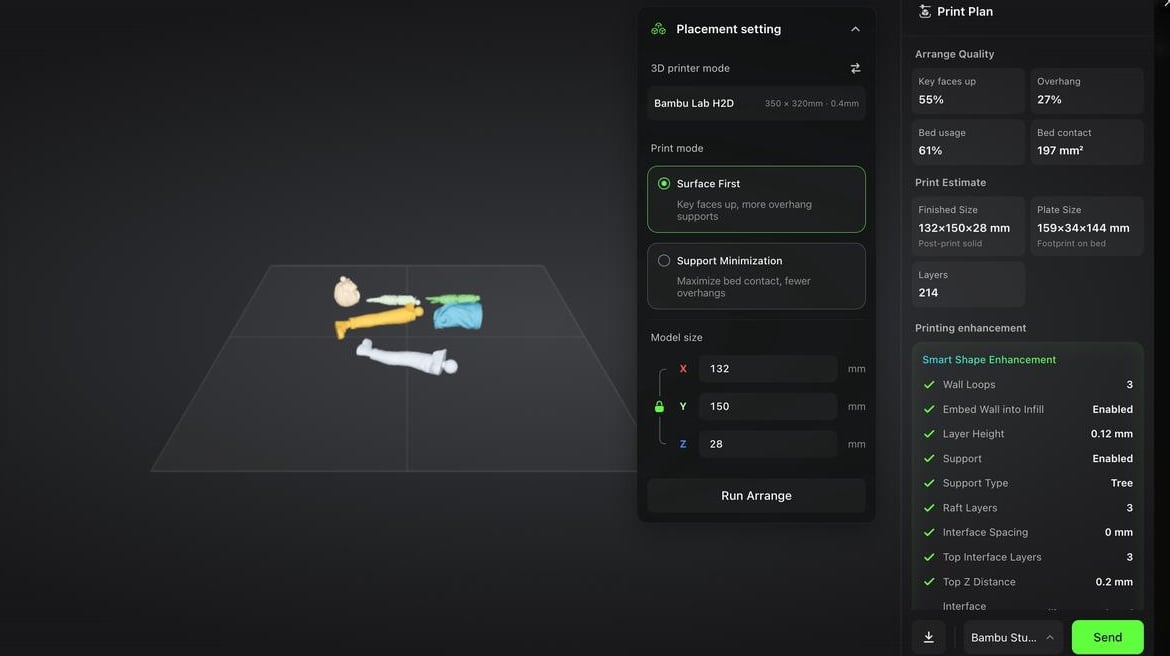
Smart Build Plate Layout brings the same automation logic to print orientation and bed arrangement. The system offers two modes. Surface-First auto-orients models to prioritize visible face quality and assembly fit, while Low-Support minimizes support volume to save filament and reduce post-processing.
Common model types are handled automatically, so full-body figures tilt slightly back, busts use the flat base as the contact face, and long props like swords or spears auto-tilt to minimize edge supports.
For split models, the system optimizes part spacing and connector clearance to protect final assembly precision. Hi3D claims this results in 90% less time spent on part orientation and slicer settings
From there, Hi3D auto-generates print parameters based on printer model, filament type, model size, and print goal, configuring nozzle temperature, bed temperature, wall layers, infill, support settings, and layer height, meaning you won’t need to touch a slicer settings panel.
Everything is packaged into an enhanced 3MF file that encapsulates both the model and its full parameter set, so opening it in Bambu Studio, OrcaSlicer, Creality Print, or Elegoo Slicer requires no re-configuration. Instead, what arrives in the slicer is ready to print.
Maker Templates: From Photo to Physical, No Skills Required
For users entirely new to 3D printing, Maker Templates offer a zero-barrier entry point. You’ll upload a photo, pick a template, including Q-version portrait figure, realistic portrait, pet figurine, fridge magnet, or keychain, and get a print-ready result without no need for prior modeling, prompting, or slicing knowledge.
Output feeds directly into the broader Hi3D workflow, so beginners can naturally progress from their first simple template into advanced splitting, multicolor prep, and seamless slicing export.
Hi3D 1st Anniversary Celebration: Enjoy 80% Off Now
Alongside the 3.0 launch, Hi3D is running its first-anniversary promotional campaign with selected plans and packages available at up to 80% off. The campaign is an open invitation for both new and existing users to dive in and explore the upgraded AI-to-print workflow.
From June 24-27, users who purchase an annual plan can enjoy an 80% discount immediately and receive an exclusive anniversary 3D printed figurine. More surprise details and campaign gifts are available on Hi3D’s website.
With the forthcoming release of Hi3D 3.0, the platform moves significantly closer to its core mission of lowering the technical barriers of 3D creation to make it more accessible, printable, and production-ready, so every creator can bring digital models off the screen and into the physical world. Learn more at hi3d.ai.