Auto-generate 3D Prints in Blender with Geometry Nodes

A free Node Dojo application showcases the power of Blender's parametric modeling tools to quickly create bespoke drawer organizers.
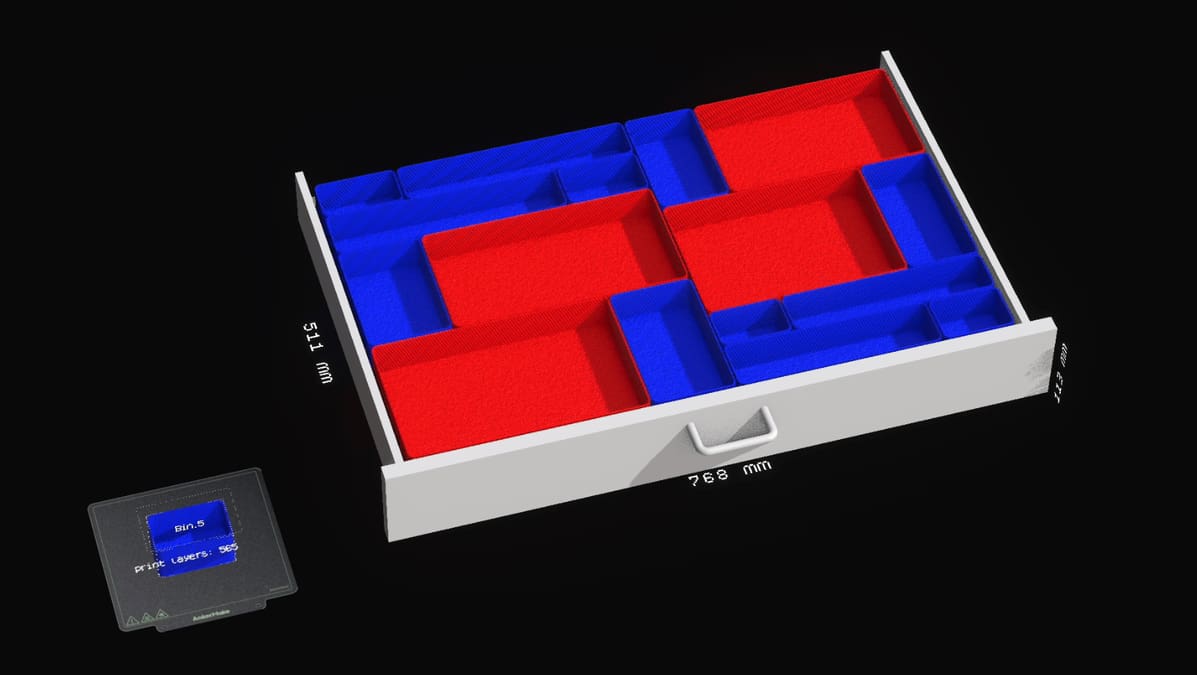
Using Blender Geometry Nodes, Node Dojo has created the “Dojo Bin Generator”: an intuitive parametric modeling Blender application that creates custom 3D printable desk drawer organizers.
Blender Geometry Nodes is a feature that allows users to create and manipulate complex 3D geometries procedurally with simple data nodes. Node Dojo’s application takes advantage of the feature by using “simple data input” (in this case, drawer size) to output parametrically controlled bins in a layout that fills a drawer’s available space. Users can then resize the bins in real-time by dragging along Blender’s X or Y divides for custom storage solutions.
You’ll need to have Blender installed to try the Dojo Bin Generator, of which there are two versions. The “Red Bin” version, in which a bin’s color indicates its printability within a specified print bed area (red is too big, blue is printable), and the “2-step” version, which automatically divides any bin that becomes too big. We imagine your choice here will depend on how deep you want to go with your customization.
Node Dojo’s application is a great example of how powerful Blender’s geometry nodes can be for practical tools, and we’d definitely encourage anyone with an interest in the feature to check it out.
The Dojo Bin Generator is available on Github as a free download and on Node Dojo’s website, where you can “purchase” it for a donation of your choice. There, you’ll also find more information about the application, including feature parameters and a “wishlist” of features and known issues.
You’ve read that; now read these:
License: The text of "Auto-generate 3D Prints in Blender with Geometry Nodes" by All3DP is licensed under a Creative Commons Attribution 4.0 International License.